PROJECT 02 · DISCOVERY / VOC

Local Voice of Customer Analyzer

A privacy-first local LLM workflow that structures messy feedback, identifies recurring product signals, and turns them into evidence for prioritization or strengths-based decisions.

OUTCOME ~98%
less analysis time~3 hours → ~3 minutes to classify and analyze ~60 feedback items
PRODUCT AREAVoice of Customer
FOCUSDiscovery and prioritization
TECHNOLOGYPython · Ollama · Qwen

THE PROBLEM

Feedback was abundant. Decision-ready evidence was not.

Product Managers receive feedback through reviews, surveys, support tickets, and interviews. Without structure, teams can overreact to isolated complaints, miss recurring patterns, or prioritize from intuition rather than evidence.
HOW THE MVP WORKS

Structure the signal before making the decision.

The pipeline runs locally through Ollama. Its four capabilities move raw feedback from ingestion and classification to one of two decision outputs: issue prioritization or Strength Analysis.

01

Ingest and structure feedback

Reads raw feedback and converts each item into category, severity, roadmap relevance, core issue, and a recommended PM action.

02

Aggregate patterns and signals

Groups the local classifications to reveal recurring pain points, concentrated friction, product-health signals, and emerging opportunities.

03

Prioritize issues with RICE

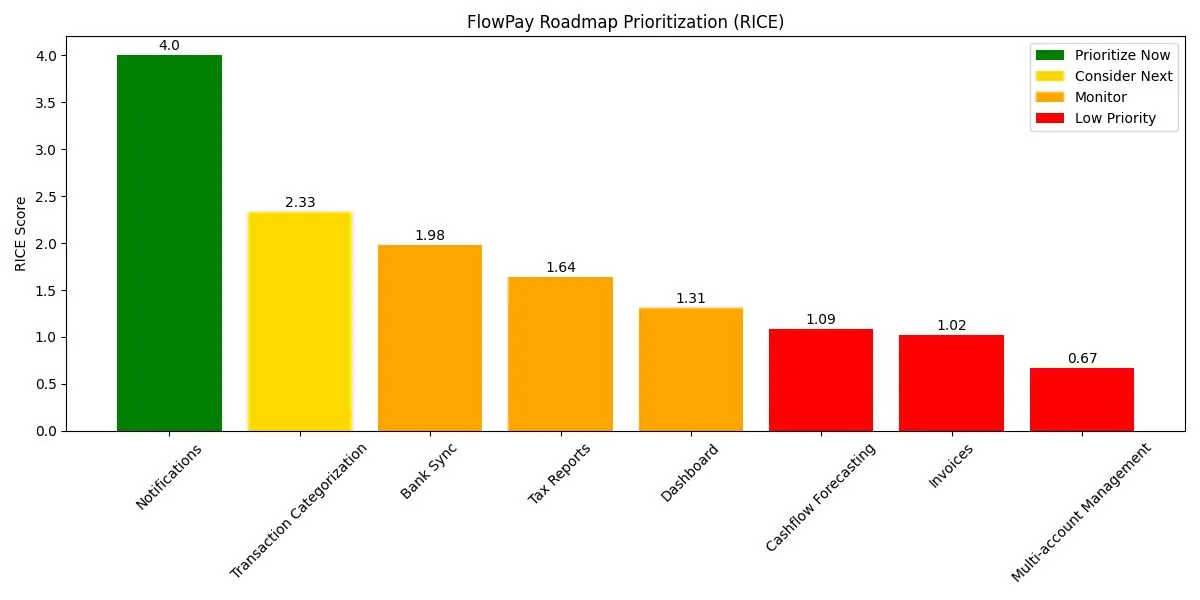
Uses normalized frequency, severity, roadmap relevance, and manually assigned effort to turn issue patterns into comparable priorities.

04

Switch to Strength Analysis

When feedback is overwhelmingly positive, the workflow stops forcing fixes and identifies differentiators worth protecting and promoting.

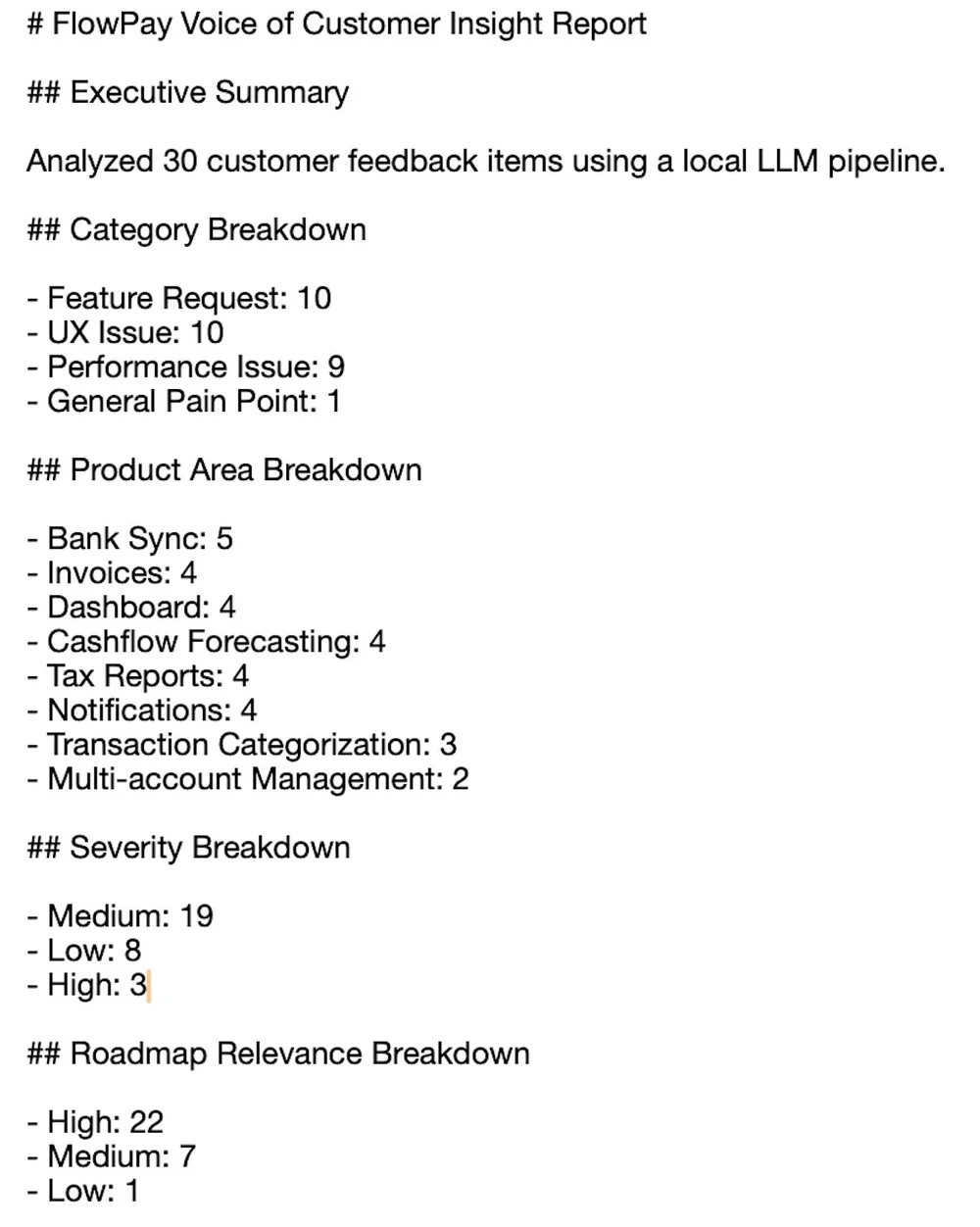
Generated Voice of Customer PM insight report
Generated PM insight report from the synthetic demonstration dataset.
RICE prioritization chart produced by the Local Voice of Customer Analyzer
RICE output: turning issue patterns into comparable priorities.
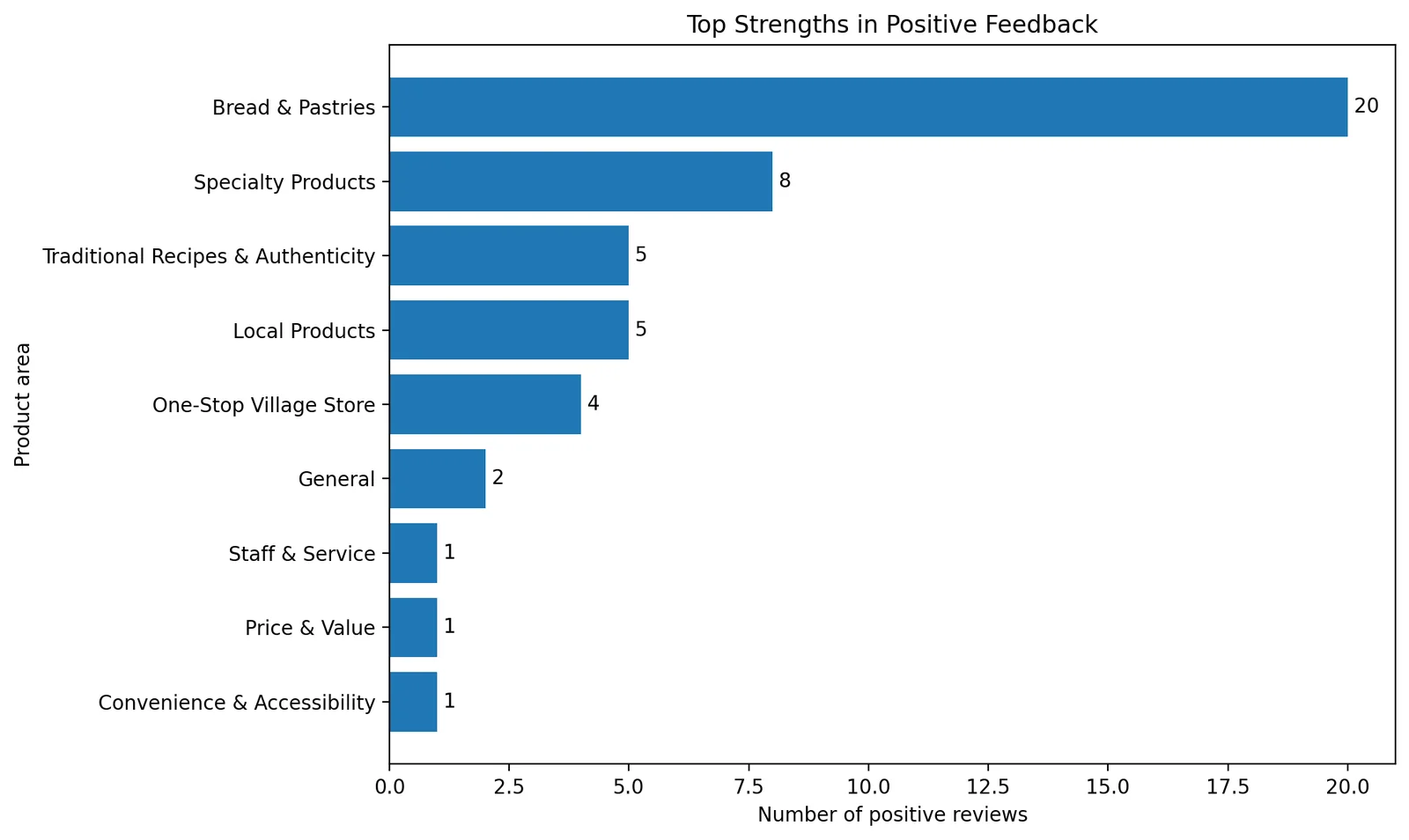
Strength Analysis chart produced from positive customer feedback
Strength Analysis output: identifying what customers already value.

THE PIVOT

Real feedback challenged the original framework.

The first version assumed that a Voice of Customer dataset should lead to a prioritized list of problems. Testing it on approximately 60 anonymized reviews from a real bakery exposed an important edge case: around 80% of the feedback was positive, so conventional issue prioritization produced limited actionable recommendations.

~60real customer reviews used in testing
~80%positive sentiment in the dataset
>75%threshold for switching analysis mode
PRODUCT DECISION
Instead of forcing backlog recommendations, the workflow was adapted to identify strengths, differentiators, and opportunities to explore.

PRODUCT DECISIONS

Product judgment remained inside the loop.

01

Run the analysis locally

Ollama keeps the workflow privacy-first: no customer feedback needs to leave the machine for classification.

02

Prioritize patterns, not individual comments

The pipeline aggregates recurring themes before applying the prioritization framework, reducing the influence of isolated feedback.

03

Adapt the method to the evidence

The Strength Analysis mode acknowledges that the right output is not always a backlog of fixes. The framework changes when the dataset tells a different story.

OUTCOME & LEARNING

AI can structure the signal; the PM still interprets it.

The project produced structured classifications, PM insight reports, roadmap-prioritization outputs, and stakeholder-ready charts. More importantly, testing showed why an automated framework must accommodate context rather than mechanically convert every dataset into feature recommendations.

KEY LEARNING
AI can structure recurring signals, but product judgment is still needed to interpret context and decide what deserves action.

Current limitations

  • Clustering still relies on predefined product areas.
  • Effort estimates are manually assigned and prioritization thresholds are simplified.
  • The real-world evaluation used a relatively small dataset of approximately 60 reviews.
Explore the implementation

See the local pipeline, sample datasets, generated outputs, setup instructions, and project documentation on GitHub.

View GitHub ↗